There is a natural tendency when looking at the universe of golf clubs in a particular category to see a sea of sameness. That confusion can lead to uncertainty, inactivity and even disinterest. But at its core, assuming all clubs are basically the same is a poor business decision. Choosing not to upgrade your game ultimately could cost you money in your Saturday morning game.
That’s why the Hot List drills deep on every club to get you as many specifics that not only describe each club’s distinct technologies but also paint as clear a picture of what our players liked most about the performance and feel of each club that made the grade this year. Not only are the Gold and Silver medals and star ratings a means of delineating differences, our Vector ratings and Top 5 scores also help to further classify differences. This year, though, we’re making it easier to see how clubs stack up against one another with the Hot List Compare Clubs feature.
Compare Clubs provides an instant snapshot of how two clubs performed in this year’s Hot List testing. Using dropdown menus, you can select the club category and then choose two clubs that you’d like to assess side-by-side. Compare Clubs shows the two clubs’ scores in terms of Gold and Silver, as well as the overall and individual criteria star ratings. Our sliding scales for the Vectors also show how the two clubs might differ in each of the five scales for a particular club category.
How you decide to use the Compare Clubs feature often is a matter of personal preference. Some players may favor how the Look/Sound/Feel ratings differ. Other might focus on differences in the vector rating for Forgiveness or Launch. Some may find subtle differences in the summary of comments between the two clubs helpful in steering them toward one direction or another. In years past, a user would have had to remember what those ratings were and then compare those to a newly opened page view for another club. This new Compare Clubs feature lets the two clubs basically sit side by side on your screen to help with a more direct evaluation.
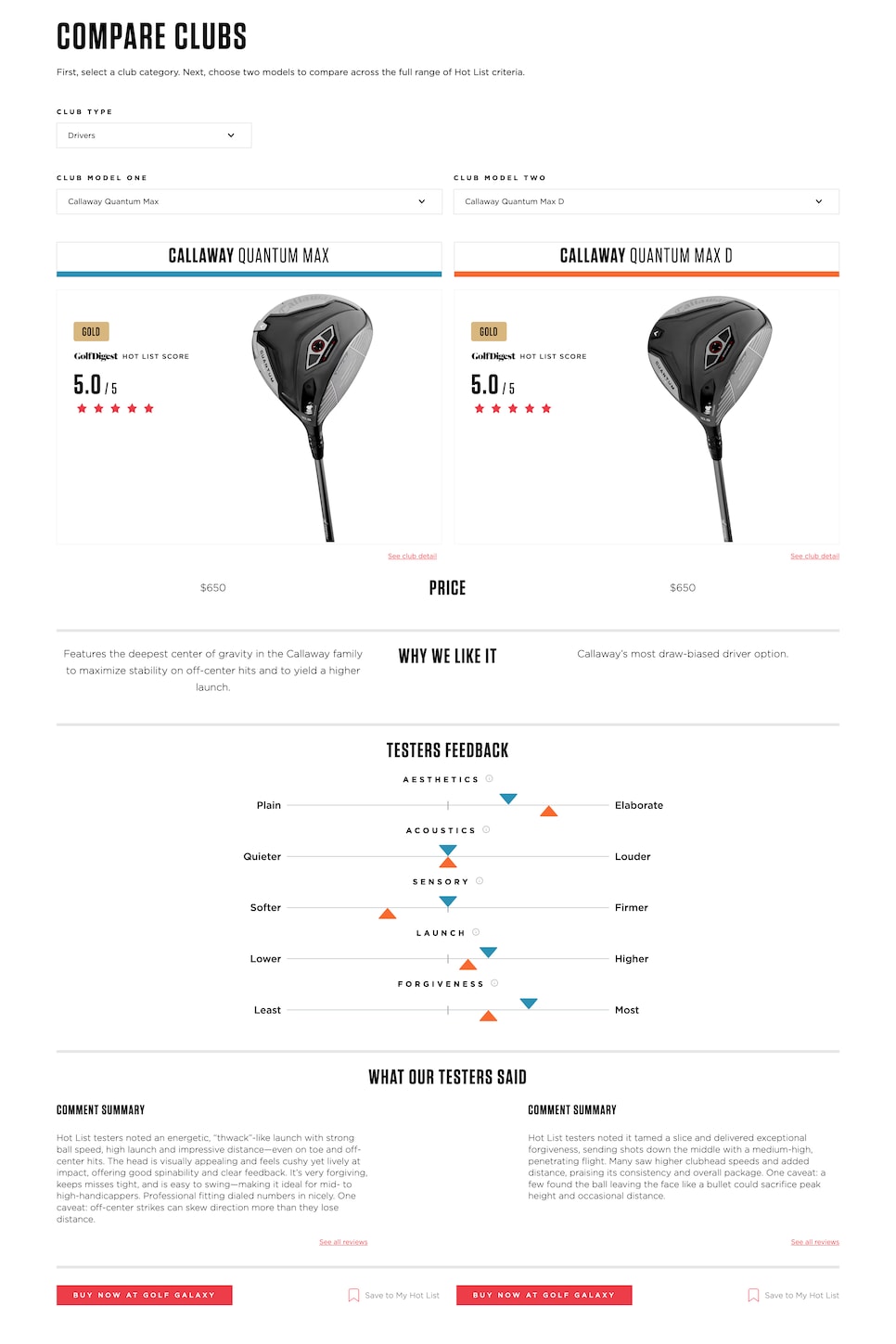
Another element to the Compare Clubs page lets golfers evaluate irons not only within the same sub-category (Players, Players Distance, Game Improvement, Super Game Improvement), it also lets golfers compare irons from different categories Given the increasing number of players switching to a mixed set, that’s especially helpful. It’s also an acknowledgement that many of the top irons today blur the lines between Players and Players Distance, or Players Distance and Game Improvement. As such, it’s very likely there will be plenty of cross-category comparisons.
The Compare Clubs feature also includes the option for a user to save a particular club to his or her virtual bag, which also can be uploaded to your fitter at Golf Galaxy. That leads to a quicker starting process when you go into your fitting, rather than aimlessly hitting several irons to start your own search.
Like the Hot List’s overall mission from the very beginning back in 2004, our intent with the Compare Clubs feature is to provide further direction as you move along your search for the next equipment that will change your game. It is a start not an ending. Getting the right clubs is a process that is best when it includes a qualified fitter assessing your game and your needs and the tools that will take your game to the next level. Using our Compare Clubs feature helps you and your fitter get off to a good start, too.
This article was originally published on golfdigest.com